
Operation Manual



password.
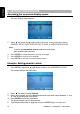
6. Press SETUP to exit the on-screen display menus.
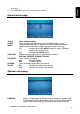
General setup page
This page controls standard DVD options.
General setup page
Setting Value and Description
ANGLE
MARK
Turns multiple-angle feature on and off. Multiple angles must be
pre-recorded on the DVD. To determine if the DVD supports multiple
angles, look for the multiple-angle symbol on the disc jacket (
).
ON Enables the use the ANGLE button to select a different
angle for the current scene.
OFF Disables the ANGLE button.
OSD LANG
Selects the language for the on-screen display menus.
ENGLISH, FRENCH, SPANISH, ITALIAN
CAPTIONS
Turns captions on and off.
ON Enables captions.
OFF Disables captions.
SCREEN
SAVER
Turns the screen saving feature on and off.
ON Enables the screen saver feature.
OFF Disables the screen saver feature.
Speaker setup page
This page controls speaker options.
Speaker page
DOWNMIX Applies to Dolby digital sound. You cannot change this option, which
is permanently set to output stereo signals, that is the player outputs
audio to both the left and right channels of the output RCA jacks.
OHM888VD / OHM1088VD / OHM1588VD
29