
Operation Manual


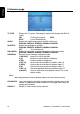

Preference page
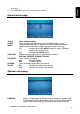
This page controls system-wide preferences.
Preference page
TV TYPE
Selects the TV system. Changing this option also changes the RCA AV
output.
PAL For Europe and Asia AUTO
NTSC For the United States
AUDIO
Selects the audible language for the DVD audio track.
ENGLISH, FRENCH, SPANISH, GERMAN, RUSSIAN
SUBTITLE
Selects the language for subtitles.
ENGLISH, FRENCH, SPANISH, GERMAN, RUSSIAN
OFF Turns subtitles off.
DISC MENU
Selects the language to display the contents of the current disc.
ENGLISH, FRENCH, SPANISH, GERMAN, RUSSIAN
PARENTAL
Restricts movie viewing to appropriate ages.
1 (KID SAF) Material is safe for children.
2 (G) Material is safe for general audiences.
3 (PG) Parental guidance suggested.
4 (PG 13) Some material unsuitable for children under 13.
5 (PGR) Some material unsuitable for children under 17.
6 (R) Some material unsuitable for children under 17.
7 (NC 17) Not recommended viewing for children under 17.
8 (ADULT) Only for adults due to the graphic content. This is the
default setting.
Note:
After setting parental control, the player prompts you for the system password.
PASSWORD
Lets you change the four-digit password using the number keys on the
remote. The default password is 3308, but it no longer works once you
change the password.
DEFAULT
Resets all values to their factory defaults.
OHM888VD / OHM1088VD / OHM1588VD 30