
Operation Manual


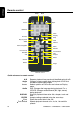

3. CONTROLS
Monitor closed
ON OFF DOOR
Eject button
Play or pause button
Stop button
Next button
Previous button
Release button
Dome light
IR Window
Dome light
Power button
Menu button
A/V input source button
Decrease button
Increase button
Dome light switch
Looking up from directly below at the player with the LCD panel closed
Quick reference to controls with monitor closed
Audio/video input
source (A/V)
Selects the video input source: DVD-IN, AV IN1 or AV IN2
Decrease button (-) Reduces a value in a menu, such as the volume.
Dome light Provides an interior light for the vehicle.
Dome light switch Configures the dome light: ON, OFF or door activated. To
manually turn the light on or off, move this switch to the ON or
OFF positions. In the door-activated position, the dome light
turns on and off when you open and close the car door.
OHM888VD / OHM1088VD / OHM1588VD
7