
User guide

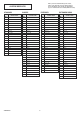


• FUNCTION
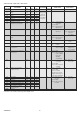
BIT EFFECT
103 – 255
98 – 102
93 – 97
88 – 92
83 – 87
78 – 82
73 – 77
68 – 72
63 – 67
58 – 62
52 – 57
48 – 52
43 – 47
38 – 42
24 – 37
12 – 24
0 – 11
Reserved
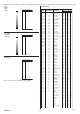
Halogen Lamp Simulation, type 5 (2500 W) Linear CTO @ 0
Halogen Lamp Simulation, type 4 (2000 W) Linear CTO @ 0
Halogen Lamp Simulation, type 3 (1200 W) Linear CTO @ 0
Halogen Lamp Simulation, type 2 (1000 W) Linear CTO @ 0
Halogen Lamp Simulation, type 1 (750W) Linear CTO @ 0
Halogen Lamp Simulation OFF (Default)
RGBW Gamma curve 3 – gamma = 2.0
RGBW Gamma curve 2 – gamma = 1.5
RGBW Gamma curve 1 – gamma = 1.0
Dimmer Curve 4
Dimmer Curve 3
Dimmer Curve 2
Dimmer Curve 1
Pan Tilt Normal
Pan Tilt Fast (Default)
Function off – rearmed
The functions are actived passing through the “unused range” and staying 5 seconds
in necessary level.
Last selected function still active. Enable setting a new function.
35
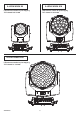
A.LEDA WASH
BIT
2
55
0
B
IT
2
55
0
Operation with option InvertTilt
G
On
•
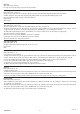
TILT FINE
O
peration with option InvertTilt
G
O
ff
DIMMER CURVE 1 - GAMMA 1 LINEAR
DIMMER CURVE 2 - GAMMA 1,5
DIMMER CURVE 3 - GAMMA 2,0
DIMMER CURVE 4 - S
•
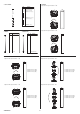
RESET
BIT
EFFECT
255
128
127
7
7
76
2
6
25
0
ZOOM RESET
UNUSED RANGE
Pan / Tilt reset is activated passing throug the unused range
and staying 5 seconds in Pan / Tilt reset levels
E
ffects reset is activated passing throug the unused range
and staying 5 seconds in Effects reset levels.
C
OMPLETE RESET
COMPLETE RESET
PAN / TILT RESET
PAN / TILT RESET
ZOOM RESET
Complete reset is activated passing throug the unused range
a
nd staying 5 seconds in complete reset levels
•
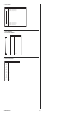
ZOOM
BIT EFFECT
255
WIDE BEAM
0
NARROW BEAM
0
-255 Bit: 0.68 sec (K20)
0
-255 Bit: 0.69 sec (K10)
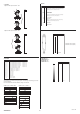
• RED LED 1 to…
GREEN LED 1 to…
BLUE LED 1 to…
WHITE LED 1 to…
BIT
EFFECT
255
0
MAXIMUM BRIGHTNESS
LED OFF
Continue
➔