
User`s manual


Chapter 4: Using the Chat Application 25
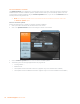
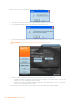
Click Ok to close the View Database Record dialog.
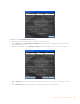
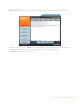
To create a custom audio settings for a device, perform the following procedure:
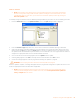
Click the 1. New button. The Add Settings to Database dialog appears with the settings of the device you had se-
lected in the database view.
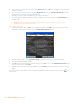
Adjust the audio settings or click 2. Upload from CHAT to upload and display the CHAT 170’s current settings.
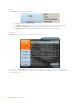
Click the3. Select 1st drop-down box and select the desired device type. Or, you can type a custom name, if neces-
sary.
Click the 4. Select 2nd drop-down box and select the desired manufacturer (or enter your own).