
User's Manual




50
English
Introduction
Setup Mode Programming
The GMRS (General Mobile Radio Service) feature is a land-
mobile service available for short-distance, two-way
communications in the USA. You must have a valid FCC
license to communicate on these channels (see page 28).
Start from GMRS Standby mode to begin GMRS Setup
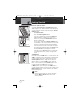
programming. Press and hold the Call/Enter/Setup button
for two (2) seconds to enter the programming mode.
CTCSS and DCS Coding Mode
Continuous Tone Controlled Squelch System (CTCSS) and
Digital Coded Squelch (DCS) coding are used in two-way
radio systems. These are sub-audible frequencies or digital
tones that are sent continuously with speech to engage
other radios with this feature. This feature is generally used
between talk groups on shared channels. Only radios with
the same subcode set will hear your transmission.
To Set CTCSS Code Entry:
1. The CTCSS code entry mode is the first mode that
begins the GMRS Setup programming.
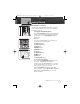
2. Display will show CTCSS icon and OFF icon
flashing.
NOTE
If CTCSS was previously set to a Code number,
display will show the current GMRS channel and
flash the CTCSS icon and Code number.
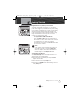
3. Codes begin at 01 and go to 38, followed by OFF,
and return back to 01 again. The last used GMRS
channel will be shown in the large digit display.
NOTE
If CTCSS is On, then DCS must be Off. If DCS is On,
then CTCSS must be Off.
4. Press Channel Up/Down button to change code
number, or press and hold Channel Up/Down
button to rapid advance (scroll).
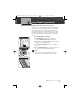
5. Press Call/Enter/Setup button to save entry and
move to the next setup programming mode.
GMRS Mode Programming
Operating Your Radio
GMRS Mode
CTCSS Code Entry
CTCSS Code Number
MRHH425VP-Body-Eng.qxp:400_Body 10/26/06 1:37 PM Page 50