
Operating instructions

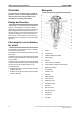

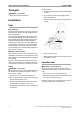
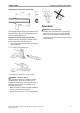


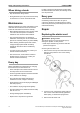


Function selector: Drilling and breaking
● Drilling
Turn the function selector downwards. This will
engage rotation and flushing air.
● Breaking
To adjust the direction of the tool blade, put the
function selector in the neutral position.
● Locked position
Lock the tool blade in the desired position by
turning the selector upwards. The rotation
mechanism is now locked.
Drilling
1. Before drilling, check that the flushing hole in the
drill steel is not blocked.
2. Stand in a stable position with your feet well away
from the inserted tool.
3. Press the inserted tool against the place where
you wish to drill.
4. Increase the engine speed once the drill bit has
collered a footing in the material.
5. Grip the side handle for better control of the
machine.
Number of revs
The engine speed is regulated by means of the
throttle lever:
SpeedThrottle lever
Idling speedLever released
Full engine speedLever depressed
Ground probing
If the machine is started on the top of long tools such
as probing rods, a starter-cord bracket must be used
to prevent the cord from damaging the fuel tank.
Drilling deep holes
1. Use a short drill and then fully drill into the hole.
2. Change to a longer drill with a slightly smaller bit
diameter (approx. 1mm smaller).
17© 2010 Atlas Copco Construction Tools AB | No. 9800 0955 01b | 2010-01-01
Original instructions
Safety and operating instructionsCOBRA COMBI