
User guide

Chapter 2: About the Printer and Imaging
B780 UG00001 B 10/06 B780 Two-Color Thermal/Impact Hybrid Printer: User Guide
5
User controls for both B780 printers
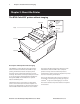
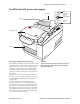
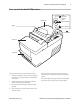
The printer and imager have the following controls:
The Paper Feed button advances the receipt paper
and allows you to step through the conguration
menu items.
The On-line, Paper Status, Error light shows the
printer status by shining or ashing.
The slip-in light indicates that a form is inserted
properly.
The reset button clears the printer’s memory and
resets the printer.
1.
2.
3.
4.
After the printer is turned on or reset, it beeps once
to show that it has completed its startup and self-test
routine.
If the printer keeps beeping, something is wrong with
the printer. Please call your service representative.
Receipt Cover
Reset Button
Front Cover
Receipt
Slip or check
On-line,
Paper status,
Error Light
(green)
Paper Feed Button
Slip in Light (green)
1
3
2
4