
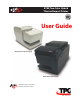
User guide

2 Chapter 2: About the Printer and Imaging
B780 Two-Color Thermal/Impact Hybrid Printer: User Guide B780 UG00001 B 10/06
The TPG B780 is a small, ecient printer for banking.
It features fast black and white or ColorPOS
®
receipt
printing. The B780 also features an impact printer
that prints checks or multi-part forms that you insert
manually. These forms can have up to four parts and can
be in a variety of sizes. Built-in Magnetic Ink Character
Recognition (MICR) check validation is an optional
feature of the B780 printer.
The B780 ts easily in spaces where no other hybrid
printer can and connects to most host computers via
the Dual 9-pin /USB interface or 25-pin RS-232 interface.
Powered USB and Ethernet interface are also available.
The printer’s standard command set allows it to work
with software written for TPG or other compliant
printers. A variety of sensors enable the printer to
communicate its status to the host computer. The printer
also has an electronic journal feature.
The easy-to-use thermal printer requires no ribbon or
ink cartridge. Load new paper by simply opening the
clamshell
TM
receipt cover and dropping in a new roll.
This section describes the printer’s features and options
in more detail.
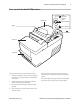
Chapter 2: About the Printer
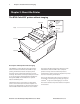
The B780 ColorPOS
®
printer without imaging
Receipt Cover
Front Cover
Receipt
Slip or check
On-line,
Paper status,
Error Light
(green)
Paper Feed Button
Slip in Light
(green)
Description of B780 printer without imaging