
User manual



RS232C Interface Page 9
Columbia Weather Systems, Inc.
Operation
Once the initial setup is complete, no user intervention should be necessary to collect or
print weather data.
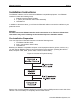
Based on the selected repetition rate, the Capricorn II will output data through the Interface
to your device in the following manner:
Figure 7: Capricorn II Report Format
CAPRICORN II WEATHER REPORT
INSIDE TEMP XXX.X. DEGREES F
OUTSIDE TEMP XXX.X. DEGREES F
WIND CHILL TEMP XXX.X. DEGREES F
HIGH TEMP XXX.X DEGREES F
LOW TEMP XXX.X. DEGREES F
WIND DIRECTION XXX
WIND SPEED XXX MPH
HIGH WIND SPEED XXX MPH
PEAK WIND GUST XXX MPH
BAROMETER XX.XX INCHES
HIGH BAROMETER XX.X.X INCHES
LOW BAROMETER XX.XX INCHES
WIND ALARM +AUDIBLE+ > XXX MPH
TEMP ALARM +AUDIBLE+ < XXX DEG F
CAPRICORN II CALIBRATE MODE*
*When the Capricorn II is in the Calibrate Mode, this message is output in place of all other
data.
Other measurement units are available, and are controlled by switches on the Capricorn II
console:
Temperature DEGREES Celsius or Fahrenheit
Wind Speed MPH, KPH, KNOTS
Barometric Pressure INCHES (HG) MILLIBARS
Wind Alarm SILENT, AUDIBLE, OFF
MPH, KPH
Temperature Alarm SILENT, AUDIBLE, OFF
DEG C or F
Note: The Capricorn II RS232C Interface automatically sends a carriage return <CR> and a
line feed <LF> after each record and after each report.
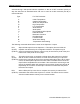
To request individual parameters for immediate display, type the corresponding character
shown in the table below. (NOTE: Character must be in UPPER CASE.)This may be