
Installation and Operation Manual





INS_NetWave_REV– 06/10/13 PAGE
26
INSTALLATION AND OPERATION MANUAL
NETWAvE
Time Sets the time of day to reboot if the Mode is by Time.
Services
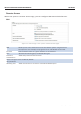
In the System» Services page, you can configure the Ping Watchdog and the Auto Reboot.
Ping Watchdog
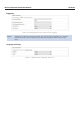
Figure 23: Ping Watchdog settings in the System » Services page.
Configures the device to ping to a remote IP address and reboot if the connection is
lost. It is disabled by default.
Ping
Watchdog
IP Address
to Ping
Sets the remote IP address to ping e.g. 192.168.10.10 or 8.8.8.8.
Ping Interval Specifies the time between successive pings, the default being 5 seconds.
Startup
Delay
Sets the time delay after the device finishes rebooting, before running the Ping
Watchdog, the default being 60 seconds.
Failure Count Specifies the number of failed pings before the device reboots automatically.
to Reboot
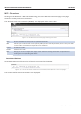
Auto Reboot
Figure 24: Auto Reboot settings in the System » Services page.
Auto Reboot Allows the device to reboot itself automatically, disabled by default.
Mode Chooses the Auto Reboot mode by Time or by Number of Hours.
Number of
Hours
Sets the delay as an integer number of hours after each reboot, if the Mode is by
Number of Hours.