
Installation and Operation Manual





INSTALLATION AND OPERATION MANUAL
NETWAvE
INS_NetWave_REV– 06/10/13 PAGE
35
MAC‐Address Lets you allow only devices with the listed MAC address to associate with this AP, or lets
Filter you block devices with the listed MAC address.
MAC-Filter
This section tab is only available for a device operating as an AP.
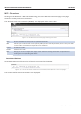
Figure 41:Configuring the MAC-Filter for a Wifi AP.
MAC‐List Adds the MAC address of the remote device to either block or allow.
Advanced Settings
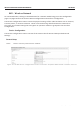
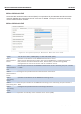
Figure 42: Advanced Settings for the Wifi Interface.
Prevents station‐to‐station communication, unchecked by default. When Station
Isolation is disabled, wireless clients can communicate with one another normally
by sending traffic through the AP. When Station Isolation is enabled, the AP blocks
communication between wireless clients on the same AP.
Separate
Clients
Maximum
Stations
Specifies the maximum number of associated stations, the default being 127.
Sets the minimum received signal strength indicator for a station to be associated. The
default value of 0 means that the AP would allow a station to associate independent of
its RSSI.
Limit RSSI
VLAN
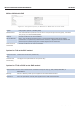
Figure 43: Advanced Settings for the Wifi Interface.
VLAN Settings page allows you to assign specific VLANs to an interface. VAP VLAN is the Virtual
AP VLAN Connection over the wireless port.