
- Avio Intelligent Projector User's Manual

E-11
A Check of the Supplied Items and the Names of the Parts
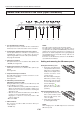
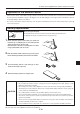
Names and Functions of the Parts (Operation Panel)
1. ON/STANDBY LED
Lit red during standby and lit green when the projection
lamp is on. See Page E-21.
2. LAMP/COVER LED
Lit green during projection. Lit red when the air filter or
lamp unit cover is not in place.
• At the time of the projection lamp lighting operation, the
LED ashes for about 6 seconds and then lights green.
• At the time of a projection lamp lighting failure, the LED
ashes green. (The ashing interval when the projection
lamp is off will be longer than when the LED ashes at
other times.)
• When the projection lamp is off, the LED ashes green
for 60 seconds and then goes off.
• When the projection lamp has been used in excess of
1,900 hours, the LED ashes red; when use exceeds
2,000 hours the LED is lit a steady red.
See Page E-45.
3. TEMP LED
When the internal temperature has risen excessively, the
LED ashes red for 10 seconds, then is lit a steady red.
See Page E-45.
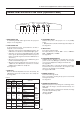
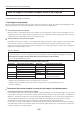
LED List
LED State
Significance
ON/
STANDBY
LAMP/
COVER
TEMP
Off Off Off AC power OFF
Normal
condition
Red Off Off Standby
Green
Flashing
green
Off
Standby to start of projec-
tion
E n d o f p r o j e c t i o n t o
standby
Green Green Off Projecting
Red Red Off
Lamp cover open
Power
has been
switched
OFF
because of
the alarm
Lamp burned out
L a m p u s a g e e x c e e d s
2,000 hours
Red Orange Off Internal problem
Red Off Red
Temperature fault
Fan fault
Green
Flashing
red
Off
L a m p u s a g e e x c e e d s
1,900 hours
Alarm
sounding
Green Green
Flashing
red
Abnormal temperature
warning
4. ON/STANDBY Button
Switches the power of the projector on or off (standby
mode).
• Only this button is effective when the projection lamp is off.
See Page E-21.
5. INPUT Button
Press this to switch the input.
The input switches as follows: OHP
→ PC → VIDEO or
OHP → VIDEO (D4) → VIDEO.
See page E-23.
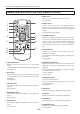
6. ROTATION/TRANSFER Button
At OHP selection: Changes over the direction of the pro
-
jection screen every 90 degrees (clockwise). The changed-
over screen is displayed according to the lateral axis.
See page E-23.
When a USB cable is connected, the images stored in the
internal memory are transferred to the computer. (This
function is only available on the iP-40SE.)
See pages E-26 and 32.
7. FREEZE OFF Button
Cancels the still image mode.
This is used when checking the projection screen while
moving the document.
See Page E-27.
8. FREEZE/CAPTURE Button
Makes the projection screen image into a still image. In the
OHP mode, the image is stored in internal memory as a
thumbnail.
When the SD memory card has been inserted, the image
is saved in the SD memory card. *
* Only for iP-40SE.
See Page E-26.
ON/STANDBY
LAMP/COVER
TEMP
FREEZE OFF
FREEZE/CAPTURE
ROTATION
INPUT
TRANSFER
1 2 3 4 5 6 7 8