
Specifications

Crestron Isys™ TPS-5000L 12 Inch Lectern/Wall Mounted Touchpanel
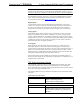
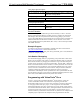
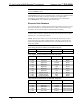
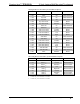
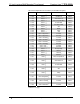
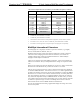
Video and XGA Digital Reserved Join Numbers for TPS-5000L Touchpanels (continued)
JOIN # FUNCTION VALUE IN/OUT
17166 Video 2 Saturation
2
Decrease INPUT
17167 Video 2 Hue
2
Increase INPUT
17168 Video 2 Hue
2
Decrease INPUT
17169 Video 2
2
No Input Flag INPUT
17170 Video 2
2
AGC On INPUT
17171 Video 2
2
AGC Off INPUT
17172 Video 2
2
Defaults
3
INPUT
17011 XGA Auto Detect
4
On INPUT
17012 XGA Auto Detect
4
Off INPUT
17016 XGA Preset 1
4
XVGA Preference
Setting
5
INPUT
1. Available only when TPS-VIDL-1 is installed.
2. Available only when TPS-VIDL-2 is installed.
3. Video default is 50% for each of the video parameters (brightness, contrast, saturation, and hue)
4. Join numbers 17011, 17012, and 17016 are available only when TPS-XVGAL is installed.
5. Join numbers 17016 through 17031 corresponds to preset 1 through preset 16 sequentially.
MultiByte International Characters
Most languages use a single byte of 8 bits to represent a character, e.g. English,
French, German, Hebrew, Russian, Thai, etc.
Multibyte character fonts require more than the usual 8 bits to specify a character.
This occurs when a language has more than 256 characters (2
8
) in a font. For
example, Chinese fonts contain several thousand characters. Other multibyte
languages include Japanese and Korean.
There are two separate issues with multibyte characters - static text on buttons and
indirect text on buttons. No Isys touchpanel firmware changes are required in either
case.
Static text on a button, entered in the standard way in VT Pro-e, always works under
Windows 98. Under Windows XP, you must use VT Pro-e 3.0 or later.
Indirect text on a button is entered in VT Pro-e and the actual string to be displayed
is entered in SIMPL Windows. You must use VT Pro-e 3.0 or later to guarantee that
the full set of characters in the font is stored on the touchpanel. You must use SIMPL
Windows 2.03.11 or later to enter Chinese characters directly. As of this publication
date, only completely single byte or completely multibyte strings may be entered or
they will not be compiled correctly in SIMPL Windows. In other words, you cannot
enter Chinese character interspersed with numbers. You can enter Chinese characters
or numbers in separate strings. Crestron is scheduling time to fix this in the near
future and the release notes for SIMPL Windows will mention it.
For now, the workaround of showing a graphic that displays the string can be used,
but it is not dynamic.
Operations Guide - DOC. 5783A 12 Inch Lectern/Wall Mount Touchpanel: Crestron Isys™ TPS-5000L • 35