
Specifications


12 Inch Lectern/Wall Mounted Touchpanel Crestron Isys™ TPS-5000L
File Transfer | Update Touchpanel Firmware Command
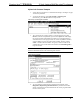
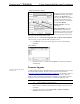
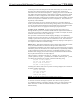
3. As shown after this step, select the NET ID of the TPS-5000L touchpanel
and then click OK. The “Open” window appears (refer to the subsequent
graphic).
“Select Network ID” Window
Check Send Direct to Wired Touchpanel if
connected via RS-232 directly to
touchpanel.
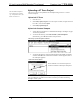
Select CSF File
4. Browse to the .csf file and click Open to begin the transfer.
42 • 12 Inch Lectern/Wall Mount Touchpanel: Crestron Isys™ TPS-5000L Operations Guide - DOC. 5783A