
User Manual Part 2





CY8CKIT-042-BLE Bluetooth® Low Energy (BLE) Pioneer Kit Guide, Doc. # 001-93731 Rev. *A 140
Advanced Topics
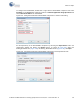
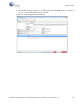
7. In the Bootloader Host tool, click Filters and add a filter to identify the USB device. Ensure that
the check box for
Show USB Devices is enabled. Set VID as 0x04B4, PID as 0xF13B, and click
OK, as shown in Figure 6-37.
Figure 6-37. Port Filters Tab in Bootloader Host Tool