
User Manual Part 2

CY8CKIT-042-BLE Bluetooth® Low Energy (BLE) Pioneer Kit Guide, Doc. # 001-93731 Rev. *A 123
Advanced Topics
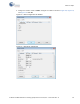
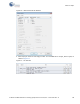
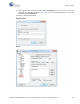
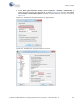
4. In HyperTerminal, select Bits per second, Data bits, Parity, Stop bits, and Flow control under
Port Settings and click OK, as shown in Figure 6-11. Make sure that the settings are identical to
the UART settings configured for the BLE device.
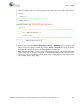
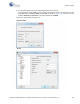
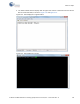
In PuTTY select
Speed (baud), Data bits, Stop bits, Parity and Flow control under Configure
the serial line
. Click Session and select Serial under Connection type. Serial line shows the
communication port (COM12) and
Speed shows the baud rate selected. Click Open to start the
communication.
Figure 6-11. Configure the Communication Port
HyperTerminal
PuTTY