
User Manual Part 2



CY8CKIT-042-BLE Bluetooth® Low Energy (BLE) Pioneer Kit Guide, Doc. # 001-93731 Rev. *A 132
Advanced Topics
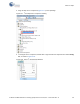
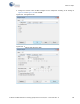
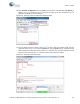
10.Open Protocol Configuration from the Tools menu and select the appropriate I2C Speed, as
shown in Figure 6-23. Make sure the I
2
C speed is the same as the one configured in the I
2
C
component. Click
OK to close the window.
Figure 6-23. Opening Protocol Configuration Window in BCP
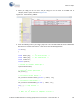
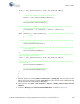
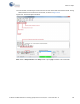
11.From the BCP, transfer five bytes of data to the I
2
C device with slave address 0x08. Type the
command shown in Figure 6-24 and press
[Enter] or click the Send button in the BCP. The log
shows whether the transaction was successful. A '+' indication after each byte indicates that the
transaction was successful and a '–' indicates that the transaction was a failure.
Figure 6-24. Entering Commands in BCP