
User Manual Part 2

CY8CKIT-042-BLE Bluetooth® Low Energy (BLE) Pioneer Kit Guide, Doc. # 001-93731 Rev. *A 137
Advanced Topics
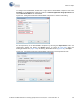
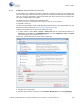
To configure the Bootloadable, double-click or right-click the Bootloadable component and select
Configure. In the General tab, enable the check box for Manual application image placement and
set the
Placement address to ‘0x00002800’.
Figure 6-31. Configuration Window of Bootloadable Component in “General” Tab Setting
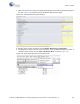
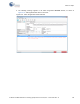
Set the dependency of the Bootloadable component by selecting the
Dependencies tab in the
configuration window and clicking the
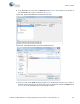
Browse button, as shown in Figure 6-32. Select the
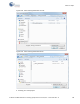
KitProg_Bootloader.hex (Figure 6-33) and KitProg_Bootloader.elf files (Figure 6-34); click Open.
Figure 6-32. Configuration Window of Bootloadable Component in the Dependencies Tab