
User Manual Part 2


CY8CKIT-042-BLE Bluetooth® Low Energy (BLE) Pioneer Kit Guide, Doc. # 001-93731 Rev. *A 144
Advanced Topics
4. Connect the 10-pin connector of MiniProg3 to the onboard 10-pin SWD debug and programming
header J7 (which needs to be populated).
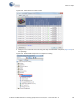
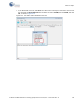
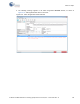
5. To program the PSoC 5LP with PSoC Creator, choose
Debug > Program or press [Ctrl] [F5]. If
the Programming window appears and shows MiniProg3 and the selected device in the project
under it (CY8C5868LTI-LP039); click on the device and click
Connect to program.
Notes:
■ The 10-pin SWD debug and programming header (J7) is not populated. See the 'No Load
Components' section of A.3 Bill of Materials (BOM) for details.
■ The PSoC 5LP pins are brought to the PSoC 5LP GPIO header (J8). These pins are selected to
support high-performance analog and digital projects. See PSoC 5LP GPIO Header (J8) on
page 97 for pin information.
■ Take care when allocating the PSoC 5LP pins for custom applications. For example, P2[0]–P2[4]
are dedicated for programming the PSoC 4. Refer to A.1 Schematics before allocating the pins.
■ When a normal project is programmed onto the PSoC 5LP, the initial capability of the PSoC 5LP
to act as a programmer, USB-UART bridge, or USB-I
2
C bridge is not available.
■ The status LED does not function unless it is used by the custom project.
6.4 PSoC 5LP Factory Program Restore Instructions
The BLE Pioneer Kit features a PSoC 5LP device that comes factory-programmed as the onboard
programmer and debugger for the PSoC 4 BLE/PRoC BLE device.
In addition to creating applications for the BLE device, you can also create custom applications for
the PSoC 5LP device on this kit. For details, see section Developing Applications for PSoC 5LP on
page 134. Reprogramming or bootloading the PSoC 5LP device with a new flash image will
overwrite the factory program and forfeit the ability to use the PSoC 5LP device as a programmer/
debugger for the BLE device. Follow the instructions to restore the factory program on the PSoC
5LP and enable the programmer/debugger functionality.
6.4.1 PSoC 5LP is Programmed with a Bootloadable Application
If the PSoC 5LP is programmed with a bootloadable application, restore the factory program by
using one of the following two methods.
6.4.1.1 Restore PSoC 5LP Factory Program Using PSoC Programmer
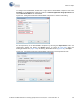
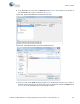
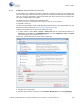
1. Launch PSoC Programmer 3.21.1 or later from Start > Cypress > PSoC Programmer.
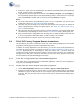
2. Configure the BLE Pioneer Kit in service mode. To do this, while holding down the reset button
(SW1 Reset), plug in the BLE Pioneer Kit to the computer using the included USB cable (USB A
to mini-B). This puts the PSoC 5LP into service mode, which is indicated by the blinking green
status LED.