
User Manual Part 2

CY8CKIT-042-BLE Bluetooth® Low Energy (BLE) Pioneer Kit Guide, Doc. # 001-93731 Rev. *A 153
Advanced Topics
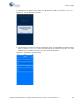
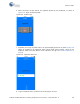
4. If Bluetooth is not enabled on the device, the app will ask to enable it, as shown in Figure 6-50.
Figure 6-50. Turn on Bluetooth on Device
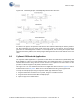
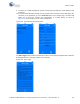
5. After Bluetooth is enabled, the app will automatically search for available BLE peripherals and list
them, as shown in Figure 6-51. Select the BLE Pioneer Kit peripheral in the list. The name
displayed in the list will be the same as that set in the BLE Component.
Figure 6-51. Peripheral Connections Page