
User Manual Part 2

CY8CKIT-042-BLE Bluetooth® Low Energy (BLE) Pioneer Kit Guide, Doc. # 001-93731 Rev. *A 154
Advanced Topics
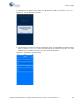
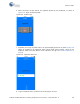
6. When connected, the app will list the supported profiles by the peripherals, as shown in
Figure 6-52. Tap on the desired profile.
Figure 6-52. Profiles Page
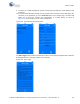
7. Depending on the type of profile chosen, the app will display options for the profile. Figure 6-53
shows an example for the CapSense slider custom profile, where swiping a finger on the
CapSense slider of the BLE Pioneer Kit is reflected in the app. See Pioneer Baseboard on
page 88.
Figure 6-53. CapSense Slider GUI
8. To go to a different service, go back to the service page in the GUI.