
User Manual Part 2


CY8CKIT-042-BLE Bluetooth® Low Energy (BLE) Pioneer Kit Guide, Doc. # 001-93731 Rev. *A 166
Advanced Topics
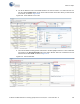
8. The list of attributes of the connected BLE device can also be saved in .csv format for later use.
For this, click the
Export button on the device tab and select the location where you want the file
to be saved, as shown in Figure 6-69.
Figure 6-69. Save Attribute List to a File
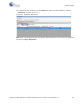
9. The tool also allows sending specific commands to the BLE peripheral device. These commands
are present in the
Send Commands tab on the device window. Select the command to be sent
from the list and click
Send, as shown in Figure 6-70.
Figure 6-70. Send Commands