
User Manual Part 2

CY8CKIT-042-BLE Bluetooth® Low Energy (BLE) Pioneer Kit Guide, Doc. # 001-93731 Rev. *A 194
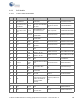
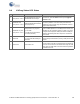
A.4 KitProg Status LED States
User Indication Scenario Action Required by user
1
LED blinks fast:
Time period = 0.25 s
LED starts blinking at power up,
if bootloadable file is corrupt.
Bootload the KitProg.cyacd file: in PSoC Programmer, con-
nect to the kit, open the Utilities tab and press Upgrade
Firmware button.
2
LED blinks slow:
Time period = 1.50 s
Entered Bootloader mode by
holding the PSoC 4 Reset button
during kit power-up.
Release the Reset button and re-plug power if you entered
this mode by mistake. If the mode entry was intentional,
bootload the new.cyacd file using the Bootloader Host tool
shipped with PSoC Creator.
3
LED blinks very fast:
Time period = 0.67 s
SWD operation is in progress.
Any I2C traffic.
Kit's COM port connect/discon-
nect event (one blink).
In PSoC Programmer, watch the log window for status mes-
sages for SWD operations. In the Bridge Control Panel, the
LED blinks on I2C command requests. In BCP or any other
serial port terminal program, distinguish the kit's COM port
number by the blinking LED when the port is connected or
disconnected.
4 LED is ON.
USB enumeration successful.
Kit is in the idle state waiting for
commands.
The kit functions can be used by PSoC Creator, PSoC Pro-
grammer, Bridge Control Panel, and any serial port terminal
program.
5 LED is OFF. Power LED is ON.
This means that the USB enumeration was unsuccessful.
This can happen if the kit is not powered from the USB host
or the kit is not connected to the USB host through the USB
cable. Verify the USB cable and check if PSoC Programmer
is installed on the PC.