
Specifications



8. Software Installation
The following sections list the procedures to follow when installing the USB to
HDMI and USB device drivers. Insert the provided CD into your CD-ROM drive,
then begin the USB Install Disc and follow the below steps to install the driver.
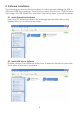
8.1 Install DispalyLink Software
Insert the CD driver included in the package and double click on the
DisplayLink icon to execute the setup.
8.2 Install USB Server Software
Double click on the USBServer Setup icon to execute the set up and click
nish when the setup is complete.
6