
User guide




Dugan-MY16 User Guide Installation and Linking
17
Setting an IP Address
We recommend this method for experts only.
To change the IP address:
1. Launch Dugan-Firmware-Updater-version#.jar.
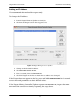
2. Click on the Dugan card in the top pane’s list.
Figure 2-2 Dugan Mixing Controller Updater
3. Change to the desired IP address.
4. Click Send New Params to Unit.
5. Wait 3 seconds, then click Refresh List.
6. Click the Dugan in the list to check that its address was changed.
If the Dugan does not appear in the list, press and hold NETWORK RESET for 3 seconds
to reset network parameters to their default values.
If the Dugan Mixing Controller Updater reports Unit Reachable: No, inspect the IP Ad-
dress
and take corrective action by repeating the steps above.