
User Guide

© Danfoss | 2021.09 | 3AQ291838446552en-010501
NovoCon® M
NovoCon® M
Application mode:
MSV:9 / 32810
Digital control (default),
Analog control
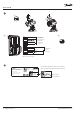
Select Valve Type
MSV:3 / 32802
(default AB-QM
NovoCon DN40)
Design Flow Rate
AV:30 / 32796 Heating
AV:31 / 32798 Cooling
Select application
MSV:10 / 32811
Heating (default)
Cooling
❻
Initial configuration
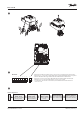
DIP Switch
Dip switches for addressing and bus protocol selection are located under the lid of the actuator.
Dip switches 1 to 7 are used to assign the MAC address manually. Default MAC address assignment
method is Auto MAC addressing for BACnet MS/TP and DIP Switches for Modbus RTU.
Dip switch 8 is used to select between BACnet MS/TP (OFF=Default) and Modbus RTU (ON).
When the protocol is changed on DIP Switch 8, a power cycle is required.
For termination of the last unit on the field bus, turn the DIP Switch R located between the
connectors to ON.
1 2 3 4 5 6 7 8 R
ON
OFF
❺
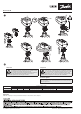
Activate calibration
MSV:0 / 33284 state 2 or
use manual calibration
❹