
User guide






3 Addressing and Setting up the Devices on the Networks
For proper function of the network, congure each device correctly.
Device Product Device
instance
MAC address Network number Baud rate IP address Subnet mask
A PC 10000 N/A N/A N/A 192.168.0.xxx 255.255.255.000
B N/A N/A N/A N/A N/A N/A N/A
C N/A 1 N/A 1 N/A N/A N/A
D UBR-01 router, RS485 100 0 1 & 2 38400 192.168.0.1 255.255.255.0
E
VLT
®
HVAC Drive FC 102, 1
st
frequency converter
1001 1 N/A 38400 N/A N/A
F
VACON
®
100 HVAC, 2
nd
frequency
converter
1002 2 N/A 38400 N/A N/A
Table 3.1 BACnet and Ethernet Settings
3.1 Setting up the IP Address and Subnet
Mask of the PC
On the PC, set up the IP address in the Internet Protocol
Version 4 (TCP/IP) Properties conguration menu.
1. Open the Control panel window.
2. Select View network status and tasks.
3. Select Local Area Connection.
4. Select Properties.
5. Select Internet Protocol Version 4 (TCP/IPv 4).
6. Select Properties.
7. Select Use the following IP address.
8. Set the IP address to 192.168.0.xx, where xx must
be a number not currently used on the network.
9. Set the subnet mask to 255.255.255.000.
10. Exit the windows to activate the new IP
addresses.
3.2 Setting up the UBR-01
To route to and from the MS/TP network, congure the
UBR-01 router via the router web page.
As factory setting, the UBR-01 has the IP address
192.168.0.1.
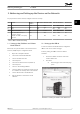
1. Enter the IP address 192.168.0.1 in the web
browser address bar.
2. Press Enter.
2a The main page of the router web page
opens.
130BF307.10
Illustration 3.1 Entering the IP Address in the Web Browser
Addressing and Setting up t... User Guide
MG92N102 Danfoss A/S © 05/2017 All rights reserved. 5
3 3