
User`s guide



Maps & Traffic Tab
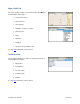
This option shows you a map of your current location. Click Menu >>
Get New Map to view a map of:
• Your Current Location
• A Favorite Place
• A Recent Place
• An Address you type or speak in
• An Intersection
• A City
• A Business
• An Airport
• A Contact from your Address Book
See page
39 for full details on these features.
Tools/Extras Tab
The Tools/Extras tab gives you options for setting your preferences
and managing other features:
• My Favorites
• Recent Places
• Record Location
• Commute Alerts
• Weather
See page
41 for full details on these features.
© TELENAV, INC. 2003-2009 PAGE 12 OF 57