
User`s guide

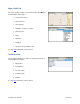


8. Drive To Tab
There are several ways to get driving directions to a desired location.
1. Select the Drive To tab. Then select one of the Drive To options in the drop-down menu.
2. Use the Search tab and search for a Point of Interest. In the Details screen, click Menu >> Drive To.
The Getting Route progress bar appears after you select a Drive To address. To edit your route, click the Edit
Route button before the progress bar reaches 100%. You will be taken to the Trip Confirmation screen, where you
can choose a field to edit. See “Navigation Options” on page
20 for more information.
© TELENAV, INC. 2003-2009 PAGE 13 OF 57