
User`s guide
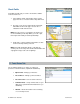


Record Location
To record your current location as a Favorite and mark it for future use, do the following:
1. Go to Tools/Extras >> Record Location.
2. The Create Favorite pop-up appears. Fill out the following information:
• Address – Your current location is listed by default. Click the trackball to select a different address.
• Category – Manage your locations by saving them in categories (see “Category” on page
43).
• Label – The default label is based on the current location. You can replace it with a label that
accurately describes your current location, like “Work”, “Amy’s School”, etc. This label will appear in
your Favorites list.
3. Click Ok when you are finished.
Commute Alerts
You can set up traffic alerts (20 maximum) for frequent
commutes. Get an email that gives you traffic information and
estimated delay time for the route that your specify. You can
also sync your Commute Alerts with the TeleNav website at
www.telenav.com.
1. Go to Tools/Extras >> Commute Alerts.
2. A list of the alerts you created are displayed in the
order they were created. Highlight an alert and click
the Menu key for additional options:
© TELENAV, INC. 2003-2009 PAGE 45 OF 57