
User Manual

Conguration
• The Speaker Preset menu enables a set of speaker
parameters to be adjusted, and preset congurations to be
created.
• Speaker Presets can be simply applied to the selected
amplier output or imported, chosen from a library,
exported or cleared. The preset congurations can include
any or all of the parameters described in Section 5.3.4
and can be locked to prevent inadvertent modication.
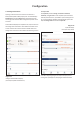
Diagrams 5e to 5h illustrate the application of speaker
presets.
Speaker Preset data provided by third parties for use with
specic speakers can be imported and applied to amplier
outputs. To import speaker preset parameters follow the
steps described below and illustrated in the diagrams.
1. Select either the IMPORT PRESET FROM FILE or
SELECT PRESET FROM LIBRARY option from the
Speaker Preset menu. If no import option is visible,
select CLEAR to delete any existing speaker preset
data.
Note: The SELECT PRESET FROM LIBRARY option will be
unavailable if no speaker preset libraries have been created. Speaker
preset library creation and management is described in Section
5.3.5.
2. Select the appropriate ‘.zcp’ format speaker preset
data le to import from either a Library or a
computer folder. The preset data will be applied
to the selected amplier output as soon as the le
import is complete.
3. If the Speaker Preset data requires modication it
can be customized by selecting the CUSTOMIZE
PRESET option.
Note: If an imported Speaker Preset data le includes locked
parameters, they will be unavailable for modication.
5.3.4 Speaker Preset Menu Parameters
• The Crossover & Gain preset menu enables high or low-
pass crossover lters and gain adjustment to be applied to
individual amplier outputs.
• The Speaker EQ preset menu enables parametric
equalization to be applied to individual amplier outputs.
• The FIR preset menu enables FIR (Finite Impulse Response)
based equalization lter coefcients generated by external
speaker measurement software to be imported and applied
to individual amplier outputs.
Note: FIR coefcient les in either .csv or .txt format can be
imported.
Select to congure
Select to congure
Select to congure
Select to congure
Select to congure
Select to congure
Select to congure
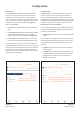
Diagram 5e
Speaker Preset Parameters
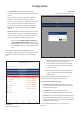
Diagram 5f
Speaker Preset import le selection
Select output