
User Manual
Conguration
5. Conguration
Before making input, output and GPIO connections,
an initial Danley DSA amplier conguration should
be established. It is particularly important that the
amplier output format is congured appropriately for
the speakers that are to be connected.
Conguration requires that Danley DSA ampliers are
connected to mains power, switched on and connected
to network services. These connections are described in
the following two sections.
5.1 Mains Power Connection
Danley DSA ampliers incorporate a power factor corrected
power supply and can be used with mains input voltage from
100V AC to 240V AC, 50/60Hz. Use the mains cable supplied
with the amplier and connect it to a mains supply.
Press the front panel power button to switch on the amplier.
After a short delay the front panel Status indicator will
illuminate green.
5.2 Network Services
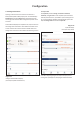
Danley DSA ampliers are congured via the Control
Web App interface. Before the Web App conguration
menus can be accessed, Danley DSA ampliers must be
connected to the same TCP/IP network as the computer
or mobile device that is to be used for conguration.
5.2.1 Wired (Ethernet) Network Connection
To connect a Danley DSA amplier to a TCP/IP network using a
wired connection (Ethernet) follow the steps below.
1. Use an Ethernet cable to connect the Danley DSA amplier
rear panel Network Control socket to a free socket on a
network router or switch, or directly to an Ethernet equipped
laptop or desktop computer.
2. Connect the Danley DSA amplier to mains power using
the supplied mains cable. Wait for the front panel Network
indicator to illuminate green to indicate that the amplier has
network connectivity.
3. The Danley DSA amplier default LAN IP address is
192.168.64.100. Congure the laptop or desktop computer
for a xed IP address in the same IP range; eg. 192.168.64.10,
with Subnet mask of 255.255.255.0 (or prex 24) and set the
Gateway to 192.168.64.1.
4. Open a laptop or desktop web browser and enter the address
http://192.168.64.100. The Control Web App interface will
open to enable amplier conguration as required.
Note: Danley DSA ampliers can be congured to use DHCP for
network connection if required. However, if a Danley DSA amplier
using DHCP is power cycled, it is possible that the TCP/IP network
router will assign it a different IP address, leaving its conguration
page inaccessible via the previous address. If this occurs, a network
scanning app can be used to identify the new IP address. DHCP and
Fixed IP address option settings can be found in the Settings Tab
menu described in Section 5.3.
5.2.2 Wireless (WiFi) Network Connection
To connect a Danley DSA amplier to a TCP/IP network using a
wireless connection (WiFi) follow the steps below.
1. With the Danley DSA amplier connected to mains power,
wait for the front panel WiFi indicator to illuminate green.
2. Use a mobile, laptop or desktop device to search for available
WiFi networks. Connect to, Danley DSA (product serial
number)’ using the password, ‘password’. The amplier serial
number can be found on its rear panel.
3. Open a computer or mobile device web browser and enter
the IP address: 192.168.4.1. The Control Web App interface
will open to enable amplier conguration as required.
4. Select the Web App Settings Tab followed by WiFi > WiFi
Mode > Client to congure the amplier to connect to the
required WiFI network. The WiFi network name and password
will be required.
It is strongly recommended that the Danley DSA amplier
Access Point WiFi password is changed following initial
wireless connection.