
User Manual

Conguration
5.3.1 Input Tab
The Input Tab provides naming, mono/stereo selection,
sensitivity, and gain trim for each amplier input channel. An
internal pink noise source, provided for system testing and set
up, can also enabled or disabled, and adjusted for gain via the
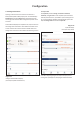
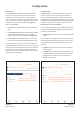
Input Tab. Diagram 5b illustrates the Input Tab.
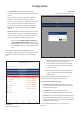
Diagram 5a
Conguration Dashboard display
(two output amplier model shown)
Diagram 5b
Input Tab display
(two inputs only shown)
Input name - type to edit
Select mono or stereo
Select input sensitivity option
Adjust input gain
Adjust zone volume
Adjust zone volume
Note: When adjusting input gain, the input level display should
remain green. If it displays red, the input gain should be reduced.
5.3 Conguration Menus
Opening a web browser that is network connected to a
Danley DSA amplier initially displays the Control Web App
Dashboard illustrated in Diagram 5a. The Dashboard is the
‘home’ page from which all other conguration options can be
accessed.
The Dashboard displays the amplier status, output zones and
the conguration menu tabs. It also enables immediate access
to zone volume control The functions available under each
conguration menu tab are described in the following sections.