
User Manual

Conguration
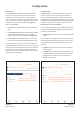
5.3.2 Zone Tab
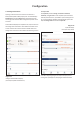
The Zone Tab enables installation zones to be dened and
named, and provides access to further sub-menus. Zones
might be bar or restaurant areas for example, or different
rooms in a home. For all Zone Tab menus, the installation zone
under conguration is selected by highlighting one of the zone
identiers (A, B, C or D) at the top of the page. Diagram 5c
illustrates the Zone Tab.
• The Source menu option enables inputs to be assigned to
zones.
• The GPIO Volume Control option enables external volume
control to be applied to individual zones. The GPIO
conguration menu can be found under the Settings Tab.
• The Compressor option enables default or custom signal
compression to be applied to individual installation zones.
Note: Compression can be useful to reduce the volume difference
between loud and quiet audio material. The lower the compression
threshold is set, the more the difference between loud and soft will
be reduced. The overall zone volume may need to be increased
when compression is used. The default compression parameters are
appropriate for most installations.
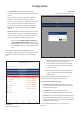
5.3.3 Output Tab
The Output Tab enables amplier outputs to be named and
provides access to further sub-menus. For all Output Tab
menus, the amplier output under conguration is selected
by highlighting one of the output identiers (1, 2, 3 or 4) at the
top of the display. The Output Tab also enables Speaker Preset
congurations to be created, exported, imported or cleared.
Diagram 5d illustrates the Output Tab.
Note: The number of individual outputs available for conguration
will depend on the Danley DSA amplier model and the input, zone
and output mode conguration.
• The Routing menu enables zones to be assigned to amplier
outputs.
Note: Routing for zones specied as stereo will automatically offer
three output options: left channel, right channel or summed mono.
The summed mono signal can potentially be used to drive a mono
subwoofer.
• The Delay menu enables delay to be applied to individual
amplier outputs.
• The Equalizer menu enables parametric equalization to be
applied to individual amplier outputs. Equalizer settings
congured for one amplier output can be copied and
applied to other outputs.
Zone name - type to edit
Output name - type to edit
Select zone
Select output
Select mono or stereo
Select input
Select zone
Enable and congure output delay if required
Enable and congure output EQ if required
Congure and manage speaker presets
Select GPIO volume control mode
Select compressor mode and enable
Adjust zone volume
Diagram 5c
Zone Tab display
Diagram 5d
Output Tab display