
Quick Reference Guide
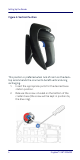


Table Of Contents
- Gryphon™ I GBT/GM4500
- Table of Contents
- END USER SOFTWARE LICENSE AGREEMENT
- About the Scanner
- Setting Up the Reader
- Reader, Cradle and LEDs Description
- Connecting the Base Station
- System and Network Layouts
- Using the GBT/GM4500 Scanner
- Using the WLC4090 Radio Base
- Replacing the Battery Pack
- Using the Gryphon™ I GBT/GM4500
- Linking the Reader
- Link Scanner as Serial Device to a Bluetooth Host
- Link Scanner as HID device to a Bluetooth host
- Power Off
- Selecting the Interface Type
- Programming
- Reading Parameters
- Operating Modes
- Technical Features
- LED and Beeper Indications
- Troubleshooting
- Ergonomic Recommendations
- Cleaning Procedure
- Support Through the Website
- Charging the Batteries
- Datalogic Limited Factory Warranty

Connecting the Base Station
Quick Reference Guide 9
Host Connection —
Verify before connection that the
reader’s cable type is compatible with your host equip-
ment.
Most connections plug directly into the host device as
shown in
Figure 7. Keyboard Wedge interface cables
have a ‘Y’ connection where its female end mates with
the male end of the cable from the keyboard and the
remaining end at the keyboard port on the terminal/
PC.
Figure 7. Connecting to the Host
Power Connection —
Plug the AC Adapter into an
approved AC wall socket with the cable facing down-
wards (as shown in
Figure 5) to prevent undue strain on
the socket.
Disconnecting the Cable —
To detach the cable, insert a
paper clip or similar object into the hole on the base, as
shown.
Figure 8. Disconnecting the Cable
Insert
Paper Clip