
Users Guide
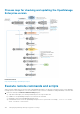

Process map for checking and updating the OpenManage
Enterprise version
Related information
Deploying and managing OpenManage Enterprise
Execute remote commands and scripts
When you get an SNMP trap, you can run a script on OpenManage Enterprise to set up a policy that opens a ticket on your third party
ticketing system for alert management. You can create and store only four remote commands for running immediately or at a later time.
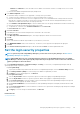
1. Enter the following in the Remote Command Setting dialog box:
a) Script name which helps you in selecting and running a correct script at a later time.
b) IP address of the OpenManage Enterprise server that runs the command.
c) Credentials to log in to the OpenManage Enterprise server.
d) Command that must be run on the OpenManage Enterprise server to open a ticket. For example, ./RCE.sh $IP $MODEL
$DATE $ASSETTAG $SERVICETAG
106
Managing OpenManage Enterprise appliance settings