
Users Guide


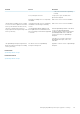

Problem Reason Resolution
• Verify if the ISP network is operating
normally.
Proxy settings are incorrect. Set proxy host, port, username, and
password as required.
Message Forwarding Service is temporarily
unavailable.
Wait for the service to become available.
The Message Forwarding Service is unable
to connect to a device platform notification
service. [Code 100-105, 200-202, 211-212]
The platform provider service is temporarily
unavailable to the Message Forwarding
Service.
Wait for the service to become available.
The device communication token is no
longer registered with the platform provider
service. [Code 203]
The OpenManage Mobile application has
been updated, restored, uninstalled, or the
device operating system has been upgraded
or restored.
Reinstall OpenManage Mobile on the device
or follow the OpenManage Mobile
troubleshooting procedures specified in the
OpenManage Mobile User’s Guide and
reconnect the device to OpenManage
Enterprise.
If the device is no longer connected to
OpenManage Enterprise, remove the
subscriber.
The OpenManage Enterprise registration is
being rejected by the Message Forwarding
Service. [Code 154]
An obsolete version of OpenManage
Enterprise is being used.
Upgrade to a newer version of OpenManage
Enterprise.
Related tasks
OpenManage Mobile settings
Related information
OpenManage Mobile settings
Managing OpenManage Enterprise appliance settings
131