
Instruction manual



18
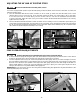
The switch (A) is located on the front panel of the saw
cabinet, as shown in Fig. 35. To turn the saw “ON”,
move the switch up to the “ON” position. To turn the saw
“OFF”, move the switch down to the “OFF” position.
IMPORTANT: When the tool is not in use, the switch
should be locked in the “OFF” position to prevent
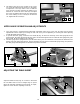
unauthorized use. Grasp the switch toggle (B) and
pull it out (Fig. 36). With the switch toggle (B) removed
the switch will not operate. However, should the switch
toggle be removed while the saw is in operation, the
saw can be turned “OFF” once, but cannot be restarted
without inserting the switch toggle (B).
To tilt the saw blade for bevel cutting, loosen the lock
knob (C) Fig. 37, and turn the handwheel (D). When the
blade achieves the desired angle, tighten the lock knob
(C).
To raise the saw blade, loosen the lock knob (A) Fig. 37,
and turn the handwheel (B) clockwise. When the blade
achieves the desired height, tighten the lock knob (A).
If the saw has a tendency to tip over,
slide, or walk on the supporting surface, secure the saw
stand to the floor.
The rubber feet (A) Fig. 34 have holes that allow you to
mount the saw stand to the floor without removing the
saw from the stand.
Fig. 34
A
Fig. 35
A
Fig. 36
B
Fig. 37
A
B
C
D
TILTING THE BLADE
RAISING THE BLADE
LOCKING THE SWITCH IN THE “OFF” POSITION
STARTING AND STOPPING THE SAW
FASTENING THE STAND TO A SUPPORTING SURFACE
OPERATION
OPERATIONAL CONTROLS AND ADJUSTMENTS