
User Manual Chapter 2






2-1
Keyboard
Keyboard Layout
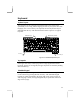
The appearance of the notebook keyboard depends on the version of the
system that you are using, and the language version of your system. For some
languages, one or two extra keys are required, and extra keystrokes may be
embedded into the keys. The illustration below shows a picture of a typical
keyboard.
Fn key
Cursor Keys
Numeric Keyboard
Function Keys
Figure 2-1: Standard Keyboard Layout
Key Legends
In the upper left corner, each keycap carries a large legend of the normal
keystroke. If there are two legends, the upper keystroke is selected by holding
down the Shift key.
Embedded Keypad
The alphabet keys on the right side have an embedded numeric keypad that
can be turned on by pressing the Num Lock key. The embedded keypad
legends are usually positioned in the upper right corner of the keycaps (in
some language versions, the keypad legends may be positioned on the front
edge of the keycap).