
User's Manual Chapter 4





4-8
Modem
Your notebook might come with the optional built-in software fax/modem that
allows you to take full advantage of the fax and communications abilities of
your system. In some countries, local regulations may not permit the use of the
fax/modem that is designed for this system. Note that the telephone jack is
covered with a cap and not present if your notebook does not have the
fax/modem option built-in.
The fax/modem is capable of running in two modes, both as a fax and as a
modem, which can be used to connect to other computers. The fax/modem can
send and receive data at up to 56 Kbps and send and receive faxes at up to 14.4
Kbps.
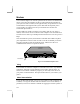
If the fax/modem is present, the notebook is installed with an RJ11 telephone
jack compartment on the rear side. In order to use the fax/modem you need to
first plug a telephone cable into the RJ11 socket, and then use the fax or
communications software to operate the device.
Fax/Modem
Figure 4-4: Fax/Modem Telephone Jack
Faxing
Your modem can allow the computer to send and receive faxes. Any Windows
application, which has a print command, can be used to generate faxes. To
send a fax from within a Windows program, you need only select the fax as
your printer for that document. Then print the document as you would to your
printer.
Modem Communications
If you purchased the modem, you can use it to connect to other computers with
a modem, or to log into networks that allow modem access. Your modem, if
purchased, can be set to emulate a terminal for logging into remote systems. It