
User's Manual Chapter 4




4-12
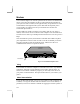
Lock Anchor
Figure 4-5: Anchor point for a Kensington-type security cable
To use this cable follow these instructions:
1. Loop the cable through or around some part of a heavy object. Make sure
there is no way for a potential thief to slip the cable off the object.
2. Pass the locking end through the loop.
3. Insert the cable’s locking end into the anchor point on your notebook, give
the key a quarter turn and remove it. The computer is now securely locked.