
User manual



Table Of Contents
- DOP eServer User Manual-cover.pdf
- DELTA_IA-HMI_DOP-eServer_UM_EN_20140707
- Table of Contents
- Publication History
- Chapter 1 Introduction
- Chapter 2 Software Installation
- Chapter 3 Before using eServer
- Chapter 4 Excel Sampling Setting
- Chapter 5 Writing Data in Microsoft Excel
- Chapter 6 ODBC Sampling Setting
- Chapter 7 Writing Data in Microsoft Access 2003 at XP Operating System
- Chapter 8 Writing Data in Microsoft Access 2007 at Windows 7
- Chapter 9 Writing Data in MySQL
- Chapter 10 Writing Data in SQL Server 2005
- Chapter 11 Writing Data in Oracle
- Chapter 12 Recipe Access Setting
- Chapter 13 Recipe Access Example
- Appendix A Upload & Download via Ethernet
Chapter 1 Introduction
1-2 Revision March, 2014
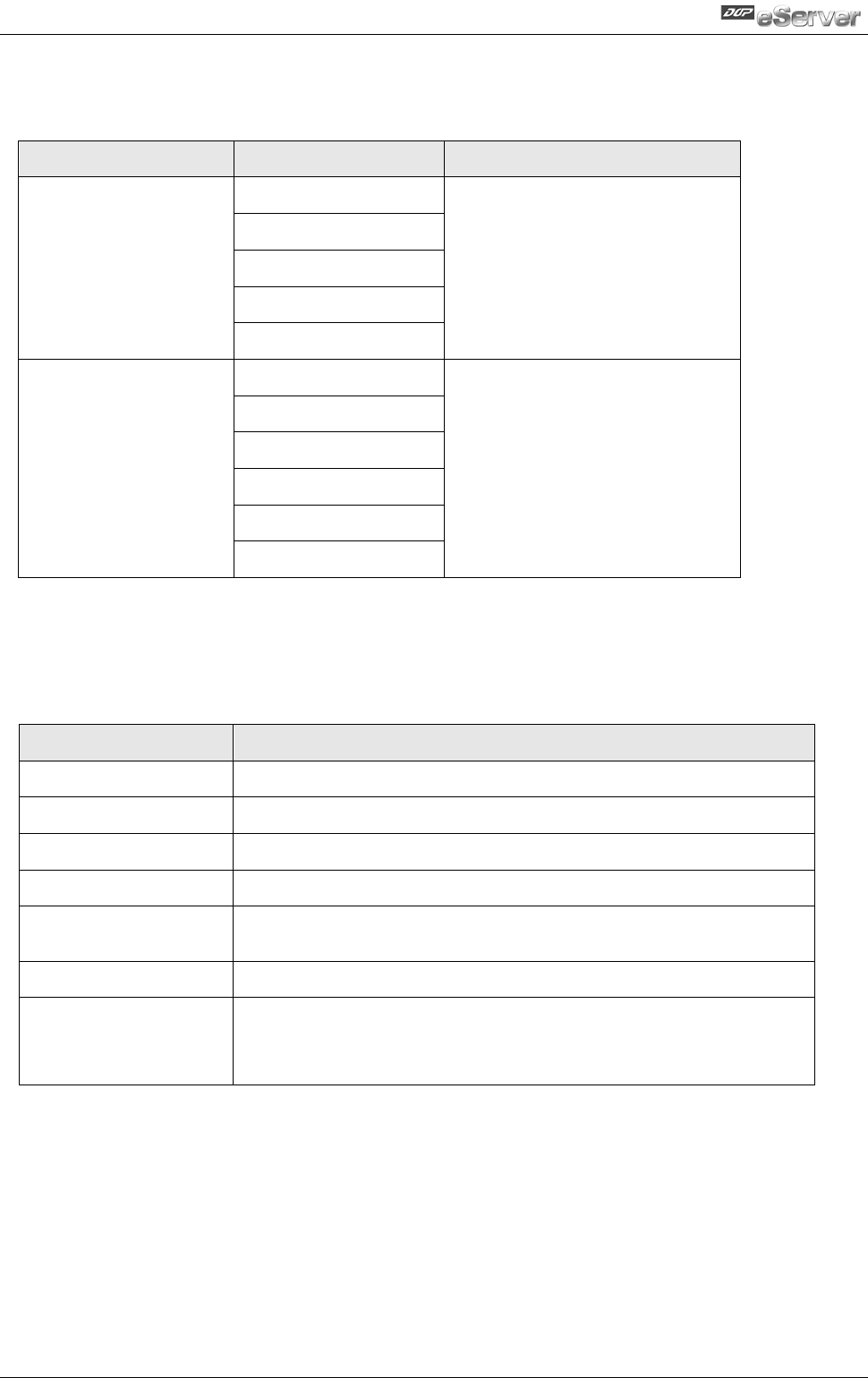
1.2 Supported Models
The supported models for eServer Data Collection Software are listed in the table below.
Series
Model Name
Remark
DOP-AE Series
DOP-AE57BSTD
DOP series Extension Ethernet
Module, DOP-EXLNHJ1AE is
required when using eServer
with DOP-AE series HMI
product.
DOP-AE57GSTD
DOP-AE57CSTD
DOP-AE80THTD1
DOP-AE10THTD1
DOP-B Series
DOP-B03E211
DOP-B07E415
DOP-B07E515
DOP-B08E515
DOP-B10E515
DOP-B10E615
1.3 System Requirement
Below are the system requirements to comply with the operating environment of eServer:
Hardware / Software
System Requirement
CPU
Pentium 4, 1.6GHz or greater is recommended
Memory
1GB and above is recommended
Hard Disk
Capacity: 50MB and above
Monitor
Support resolution: 1024 × 768 or higher full-color display.
Printer
Printer compatible with Windows 2000 / Windows XP /
Windows Vista / Windows 7
Operation System
Windows 2000 / Windows XP / Windows Vista / Windows 7
Supported Microsoft
Office Software
Microsoft Office 2000
Microsoft Office 2003
Microsoft Office 2007