
Network Adapter Instruction Manual
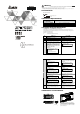

TP-PCC01
20
0 ~55
/ 6g 50.85×19.8×10 mm
TP05G/TP08G(V1.00 )
TP-PCC01
Program Copy Card
TP TP05/TP08 Series
TP
TP-PCC01 (TP TP-PCC01) TP-PCC01
TP (TP-PCC01 TP)
TP
TP-PCC01 TP-PCC01
TP
TP TP
TP TP
TP
(TP05G TP08G )
TP
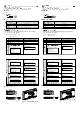
TP series and TP-PCC01 is different
Press Enter to Confirm
TP seriesTP-PCC01
Press Esc to Exit
Press CLR to Erase TP-PCC01
TP
The TP-PCC01 is Empty
TP-PCC01 TP series
is illegal
TP
TP-PCC01 will be Erased!
Press Enter to Confirm
Press ESC to Exit
TP
TP
TP series and TP-PCC01 is different
Please Remove the TP-PCC01
and Reboot
TP
Press Enter to Confirm
TP seriesTP-PCC01
Press Esc to Exit
Press CLR to Erase TP-PCC01
<Enter>
TP
Press Enter to Confirm
TP-PCC01 TP series
Press Esc to Exit
<Enter>
TP
TP series TP-PCC01
Please wait
TP
TP-PCC01 TP series
Please wait
TP
Please Remove the TP-PCC01 and
Reboot
TP-PCC01 TP-PCC01
TP
TP
Please Remove the TP-PCC01 and
Reboot
TP-PCC01 TP
TP-PCC01
mm
TP-PCC01
20
0 ~55
/ 6g 50.85×19.8×10 mm
TP05G/TP08G(V1.00 )
TP-PCC01
Program Copy Card
TP TP05/TP08 Series
TP
TP-PCC01 (TP TP-PCC01) TP-PCC01
TP (TP-PCC01 TP)
TP
TP-PCC01 TP-PCC01
TP
TP TP
TP TP
TP
(TP05G TP08G )
TP
TP series and TP-PCC01 is different
Press Enter to Confirm
TP seriesTP-PCC01
Press Esc to Exit
Press CLR to Erase TP-PCC01
TP
The TP-PCC01 is Empty
TP-PCC01 TP series
is illegal
TP
TP-PCC01 will be Erased!
Press Enter to Confirm
Press ESC to Exit
TP
TP
TP series and TP-PCC01 is different
Please Remove the TP-PCC01
and Reboot
TP
Press Enter to Confirm
TP seriesTP-PCC01
Press Esc to Exit
Press CLR to Erase TP-PCC01
<Enter>
TP
Press Enter to Confirm
TP-PCC01 TP series
Press Esc to Exit
<Enter>
TP
TP series TP-PCC01
Please wait
TP
TP-PCC01 TP series
Please wait
TP
Please Remove the TP-PCC01 and
Reboot
TP-PCC01 TP-PCC01
TP
TP
Please Remove the TP-PCC01 and
Reboot
TP-PCC01 TP
TP-PCC01
mm