
Owner's Manual
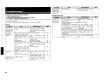
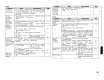
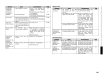
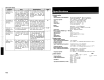
Table Of Contents
- Owners Manual
- Reset
- Table of Contents
- Supplied Accessories
- Video Conversion Information
- Parts & Controls
- Connections
- Rear Panel
- Cable Types
- Video Conversion Information
- Speaker Layout
- Connecting to a Power Amp
- RCA / XLR Pre-Out Terminals
- HDMI Connections
- Connecting a Monitor
- DVD Player
- Record Player
- CD Player
- iPod Dock
- TV / Cable Tuner
- Satellite Receiver
- DVR
- VCR
- CD / MD Recorder / Tape Deck
- Denon Link
- Front Panel Connection
- Multi-Channel Connection
- USB Port
- XM Connector
- Antennas
- Network Connection
- Multi-Zone
- External Controller (RS-232 / 12v Trigger Output)
- Power Cord
- GUI Menu Operations
- Auto Setup
- Manual Setup
- Source Select Functions & Settings
- Surround Mode
- Parameter
- Information
- Playback
- HDMI Control Function
- Channel Level
- Fader Function
- Quick Select Function
- Personal Memory Plus Function
- Last Function Memory / Backup Memory
- Remote Control Operation
- Multi-Zone Connections & Operations
- Additional Information
- Troubleshooting
- Specs
- Remote Control Codes
- XM Channel Guide
- TwonkyVision
- Warranty

4
3,4
3,
4
4
41,76,81
•
Turn
off the power and contact a
DENON service center.
• Replace with new batteries.
• Operate within the specified
range.
• Remove the obstacle.
.Insert
the batteries
in
the
proper direction, following the
polarity marks
in
the battery
compartment
• Move the set
to
a place
in
which
the remote control sensor will
not be exposed
to
strong
light
• Set the same remote IDs for the
main unit and remote control
unit.
• Set
is
damaged.
• Batteries are worn.
•
You
are
operating outside of the
specified range.
• Obstacle between main unit
and
remote control unit.
•
The
batteries are not inserted
in
the proper direction,
as
indicated
by
the polarity marks
in
the
battery compartment
•
The
set's remote control sensor
is
exposed
to
strong light (direct
sunlight, inverter type fluorescent
bulb light, etc.).
•
The
remote
ID
of the main unit
and
remote control unit do not
match.
Power turns off
suddenly and
power indicator
flashes
red.
Set does not work
properly when
remote control
unit operated.
(Remote Control Unit)
Troubleshooting
If a problem should arise, first check
the
following:
1.
Are
the
connections correct?
2. Is
the
set being operated
as
described in
the
owner's manual?
3. Are
the
other components operating properly?
If this unit does not operate properly, check the items listed
in
the table below. Should the problem persist.
there may be a malfunction.
In
this case, disconnect the power immediately
and
contact your store of purchase.
(General)
iN?>
c'J;\::~"':lj;"0'
Ca:n.
.
".'
...
·
...
·/~i;.;<,
H.Xj(·f~"
/i
;f;~"
Power does not
• Connection of the power cord
is
•
Check
that the power plug
is
23
turn
on,
or turns
faulty.
securely inserted into the
AVP-
off directly after it
A1HDCl's
AC
inlet
and
the wall
was turned
on.
power
outlet
No sound is
• The connection with the input •
Check
the connections.
11
produced from
devices
or
power amp
is
faulty.
speakers.
• Device you want to
play
and
set
• Select
an
appropriate input 43
input source
do
not match. source.
• Master
volume
is
turned
too
• Adjust the master volume to
an
56
low.
appropriate level.
• Mute mode is
set
• Cancel the mute mode.
56
• Headphones
are
connected.
• Disconnect the headphones.
56
·No
digital signals
are being
• Select
an
input source for which
43,46,47
input.
the digital input setting
has
been
made.
·The
connectors
to which the
•
Set
the input mode.
45
digital inputs are assigned and
the settable input modes
do
not
match.
Display is off.
•
The
"Dimmer"
setting
is
set to
·Set
to
something
other than
42
"OFF':
"OFF':
• The
PURE
DIRECT
mode
is
set
•
Set
a surround mode other than
50
the
PURE
DIRECT
mode.
"DOLBY
DIGITAL:'
•
DVD
player's digital audio output
•
Check
the
DVD
player's audio -
indicator does not
setting
is
not proper.
output setting.
For
details,
read
appear
on
display.
the
DVD
player's operating
instructions.
I
99
4
3,4
3,
4
4
41,76,81
•
Turn
off the power and contact a
DENON service center.
• Replace with new batteries.
• Operate within the specified
range.
• Remove the obstacle.
.Insert
the batteries
in
the
proper direction, following the
polarity marks
in
the battery
compartment
• Move the set
to
a place
in
which
the remote control sensor will
not be exposed
to
strong
light
• Set the same remote IDs for the
main unit and remote control
unit.
• Set
is
damaged.
• Batteries are worn.
•
You
are
operating outside of the
specified range.
• Obstacle between main unit
and
remote control unit.
•
The
batteries are not inserted
in
the proper direction,
as
indicated
by
the polarity marks
in
the
battery compartment
•
The
set's remote control sensor
is
exposed
to
strong light (direct
sunlight, inverter type fluorescent
bulb light, etc.).
•
The
remote
ID
of the main unit
and
remote control unit do not
match.
Power turns off
suddenly and
power indicator
flashes
red.
Set does not work
properly when
remote control
unit operated.
(Remote Control Unit)
Troubleshooting
If a problem should arise, first check
the
following:
1.
Are
the
connections correct?
2. Is
the
set being operated
as
described in
the
owner's manual?
3. Are
the
other components operating properly?
If this unit does not operate properly, check the items listed
in
the table below. Should the problem persist.
there may be a malfunction.
In
this case, disconnect the power immediately
and
contact your store of purchase.
(General)
iN?>
c'J;\::~"':lj;"0'
Ca:n.
.
".'
...
·
...
·/~i;.;<,
H.Xj(·f~"
/i
;f;~"
Power does not
• Connection of the power cord
is
•
Check
that the power plug
is
23
turn
on,
or turns
faulty.
securely inserted into the
AVP-
off directly after it
A1HDCl's
AC
inlet
and
the wall
was turned
on.
power
outlet
No sound is
• The connection with the input •
Check
the connections.
11
produced from
devices
or
power amp
is
faulty.
speakers.
• Device you want to
play
and
set
• Select
an
appropriate input 43
input source
do
not match. source.
• Master
volume
is
turned
too
• Adjust the master volume to
an
56
low.
appropriate level.
• Mute mode is
set
• Cancel the mute mode.
56
• Headphones
are
connected.
• Disconnect the headphones.
56
·No
digital signals
are being
• Select
an
input source for which
43,46,47
input.
the digital input setting
has
been
made.
·The
connectors
to which the
•
Set
the input mode.
45
digital inputs are assigned and
the settable input modes
do
not
match.
Display is off.
•
The
"Dimmer"
setting
is
set to
·Set
to
something
other than
42
"OFF':
"OFF':
• The
PURE
DIRECT
mode
is
set
•
Set
a surround mode other than
50
the
PURE
DIRECT
mode.
"DOLBY
DIGITAL:'
•
DVD
player's digital audio output
•
Check
the
DVD
player's audio -
indicator does not
setting
is
not proper.
output setting.
For
details,
read
appear
on
display.
the
DVD
player's operating
instructions.
I
99