
Product Guide






PRODUCT GUIDE
Mini/Standard/Hybrid Touch-Free RFID
|
Basic & Advanced
3
KEY INSERTION
SETUP
Manager
Locks are shipped with factory default settings (only operates by presenting hand to lock). Each lock must be set up to operate with a
Programming Key and Manager Credentials (Manager Key or Manager RFID Credential).
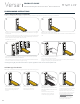
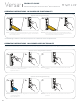
Insert the Programming Key.
A two-tone beep will be heard and the LED will turn on.
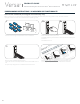
While the LED is on, insert one Manager Key or present one
Manager RFID Credential at a time.
A two-tone beep will be heard for each Manager Credential
programmed.
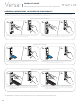
Insert the Programming Key.
A two-tone beep will be heard and the LED will turn off.
Repeat above steps for each lock or follow instructions to
Express Register Manager Credentials to set up all locks.
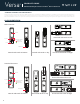
Refer to the above images for proper key insertion.
or
1
3
2
4