
Product Guide






PRODUCT GUIDE
Mini/Standard/Hybrid Touch-Free RFID
|
Basic & Advanced
4
PROGRAMMING INSTRUCTIONS
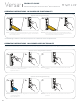
Express Register Manager Credentials
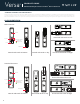
The Programming Key can quickly program multiple locks to operate with the same manager credentials.
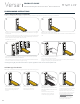
Go to a lock already programmed to operate with the manager
credentials.
Insert and hold Programming Key in place for 10 seconds (a two-
tone beep will be heard after 5 seconds followed by a second
set of two-tone beeps after 10 seconds).
The LED will turn on.
Remove key and reinsert key.
A two-tone conrmation beep will be heard and the LED will turn
off.
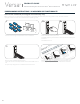
Insert the Programming Key to program each lock to operate
with the same manager credentials.
Two sets of two-tone beeps will be heard and the LED will ash
once to indicate successful programming.
End express registration mode.*
Go to any programmed lock.
Present hand to lock until a single beep is heard, then insert the
Programming Key to operate the lock.
Add Manager Credentials
Manager credentials can be programmed to the locks at any time.
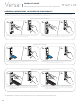
Insert and hold Programming
Key in place for 5 seconds.
A two-tone beep will be
heard.
Once beep is heard, remove
key then reinsert key.
The LED will turn on.
Insert each additional
Manager Key or present each
Manager RFID Credential one
at a time.
A two-tone beep will be
heard for each manager
credential programmed.
Insert the Programming Key.
A two-tone beep will be heard
and the LED will turn off.
Repeat above steps for each
lock or follow instructions to
Express Register Manager
Credentials to quickly
program multiple locks
to operate with the same
manager credentials.
*The Programming Key will continue to function in express registration mode until it is used to operate a lock.
Manager
or
1 2 3 4
3
1
2
4a
4b