
Product Guide






PRODUCT GUIDE
Mini/Standard/Hybrid Touch-Free RFID
|
Basic & Advanced
5
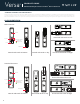
LED Usage Indicator
Shared Use
Assigned Use
PROGRAMMING INSTRUCTIONS
Manager
Replace Programming Key or Manager Credentials
The locks must be reprogrammed to prevent the lost/stolen Programming Key or manager credentials from operating a lock.
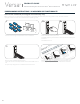
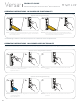
To Replace the Programming Key
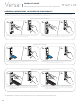
To Replace Manager Credentials
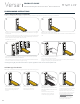
Request Functionality Change
Note the order or serial number (found
on the lock’s rear).
Note the current color of the LED. To change the functionality of the locks
(between shared use and assigned use),
contact Digilock support to request a
Function Key.
Note the order or serial number (found on the lock’s rear unit). Contact Digilock support to purchase a replacement
Programming Key.
Collect all remaining and replacement manager credentials.
Go to any lock operated by the lost/stolen manager credentials.
Insert programming key and hold for 5 secs, a two-tone beep
will be heard.
Remove programming key and reinsert again, LED will turn on.
Remove key and insert again.
Three sets of two-tone beeps will be heard and the LED will
turn off. All previously programmed manager credentials will be
erased.
Follow instructions to Add Manager Credentials to program the
remaining and replacement manager credentials to the locks.
1
1 2 3
1
2
2a
2b