
Digital Photo Frame User Manual


16
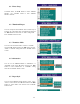
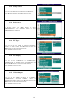
8.21 Setup Values
You can set the SETUP VALUES mode in DEFAULT
Press ► button and then “ENTER” button to enter.
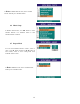
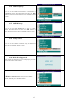
8.22 Preferences
In SETUP menu, use ▲/▼ buttons to select
“PREFERENCES”. Use “ENTER” button to enter
“PREFERENCES” submenu.
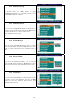
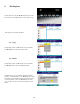
8.23 TV Type
You can set the TV TYPE in “MULTI SYSTEM”,
“NTSC” or “PAL” modes. Press ►button and then use
▲/▼ buttons to select the modes desired.
Press “ENTER” button to enter.
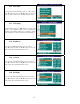
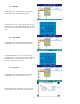
8.24 TV Display
You can set the TVDISPLAY in “NORMAL/PS”,
“NORMAL/LB” or “WIDE” modes. Press ►button and
then use ▲/▼ buttons to select the modes desired.
Press “ENTER” button to enter.
8.25 Video Output
You can set the VIDEO OUTPUT in “S-VIDEO”,
“COMPONENT”, “P-SCAN YPBPR”, “VGA” or
“INTERLACE RGB” modes. Press ► button and then use
▲/▼ buttons to select the modes desired.
Press “ENTER” button to enter.