
Digital Photo Frame User Manual


19
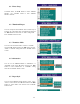
9.3 Rename
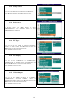
In File Library menu, use ► button to enter submenu.
Use ▲/▼ buttons to select the RENAME mode
.
In Rename mode, you can rename the file name by using
virtual keyboard. Use the ►/◄ & ▲/▼ buttons to rename
the file name. Press “OK” button to confirm the new file
name.
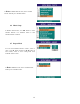
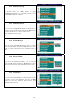
9.4 New Folder
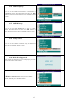
In File Library menu, use ► button to enter submenu.
Use ▲/▼ buttons to select the NEW FOLDER mode.
In NEW FOLDER mode, you can rename the NEW
FOLDER name by using virtual keyboard. Use the ►/◄
& ▲/▼ buttons to rename the file name. Press “OK”
button to confirm the new file name.
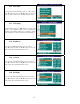
9.5 Properties
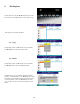
In File Library menu, use ► button to enter submenu.
Use ▲/▼ buttons to select the Properties mode.
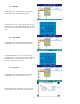
In Properties mode, the information of file size, picture
mode, resolution & file created date will be displayed.